

It's a game-changer! That's why companies are creating more and more SaaS solutions. And they have another advantage: better monetisation through subscription.
In this blog post, we'll explain what SaaS is. We'll explore examples of SaaS, its advantages and disadvantages.
Embark on the wonderful world of SaaS!
What is SaaS?
If we had to explain SaaS (Software-as-a-Service) simply, we'd say it's like a virtual library on the Internet. Instead of having to buy and install different programmes on your computer, you can simply access these programmes online. It's like borrowing video games instead of buying them.
You have a subscription and play directly on your computer or tablet. You can potentially rent as many games as you like. What's more, you can stop the subscription for games that no longer interest you.
SaaS is a type of online service that lets you use programmes or applications directly over the Internet. All without having to install them on your device.
SaaS is a software delivery model in which a third-party supplier (your company, for example) hosts software applications. It then makes them available to its customers over the Internet.
It is often used for business applications such as customer relationship management (CRM), human resources (HR) and accounting software.
Software-as-a-service pricing model
The SaaS pricing model is generally based on a subscription that users pay monthly or annually. The rate depends on the service provider. This subscription rate is generally based on usage. It may include the number of users, data storage or the number of transactions.
Some SaaS providers offer a tiered pricing model. Users can choose from different pricing plans. They offer varying levels of functionality and services. This allows users to choose the plan that best suits their needs and budget.
SaaS providers may also offer a free trial period. Users can then test the software before committing to a subscription. Some providers may offer customised pricing plans for large companies or customers with specific needs.
In conclusion, SaaS is a software delivery method that allows users to access software applications via the internet. This removes the need for companies to manage hardware and software infrastructure in-house.
Using SaaS offers a number of advantages over traditional software, such as cost-effectiveness, scalability and greater software security.
Examples of SaaS
There are many examples of SaaS (Software as a Service) applications:
- HubSpot a marketing, sales and service platform that helps companies attract, engage and satisfy their customers.
- Google Workspace A suite of productivity tools including e-mail, calendar, document editing and file storage. The biggest competitor to the classic version (downloadable onto your computer) of Microsoft Office.
- FaciliTag A platform that lets you report an incident on any type of appliance (coffee machine, toilet, etc.) by scanning a QR code.
- Salesforce Customer Relationship Management (CRM) tool used by companies to manage customer interactions and sales processes.
- Dropbox cloud-based file hosting service. It allows users to store and share files and folders online.
- QuickBooks Online QuickBooks: accounting software used by SMEs to manage financial transactions, invoicing and payments. It is simply the online version of QuickBooks, with nothing carried over.
Advantages of SaaS
- Profitability SaaS removes the need for companies to manage and maintain their software infrastructure. This can be costly, and can be accompanied by the inability to identify the costs to be paid in advance.
Instead, users pay a subscription based on usage, making it a more affordable option than traditional software models. With SaaS, costs are fixed. There are no surprises.
- Scalability SaaS: SaaS allows users to easily increase or decrease their usage according to their needs. This makes it a popular choice for enterprise applications that experience fluctuations in demand or growth. Want to add 10 new users? You can do it in a second!
- Improving software security SaaS providers manage software updates and service level agreements (SLAs). There are far fewer security breaches with SaaS.
- Accessibility SaaS allows users to access software applications from anywhere with just an Internet connection. This is particularly useful for remote working and mobile devices.
Disadvantages of SaaS
While SaaS has many advantages, it also has some potential disadvantages that companies need to consider:
- Dependence on the supplier With SaaS, companies depend on the supplier to manage the performance and maintenance of the software. This can create a dependency on the supplier. If the supplier experiences downtime or other problems, this can lead to problems with access to its software applications.
- Limited personalisation SaaS applications can have limited customisation options compared to on-premise software installations. This can be a challenge for businesses that need specific software features or customisations. The smaller you are, the less likely you are to have your requirements developed by the SaaS team.
- Data security issues Although SaaS providers take care of software security, companies may still have concerns about data security and confidentiality. It is important to carefully evaluate the security measures of potential SaaS providers.
- Subscription fees While SaaS is often more cost-effective than traditional software models, subscription fees can add up over time. Businesses should carefully evaluate the pricing structure of potential SaaS providers to ensure they are getting the best value for money...and then develop their own SaaS if necessary.
- Dependence on the internet connection SaaS applications require an internet connection to access the software. If a company experiences Internet outages or connectivity problems, this can have an impact on its ability to access its software applications.
Bonus: SaaS vs PaaS vs IaaS
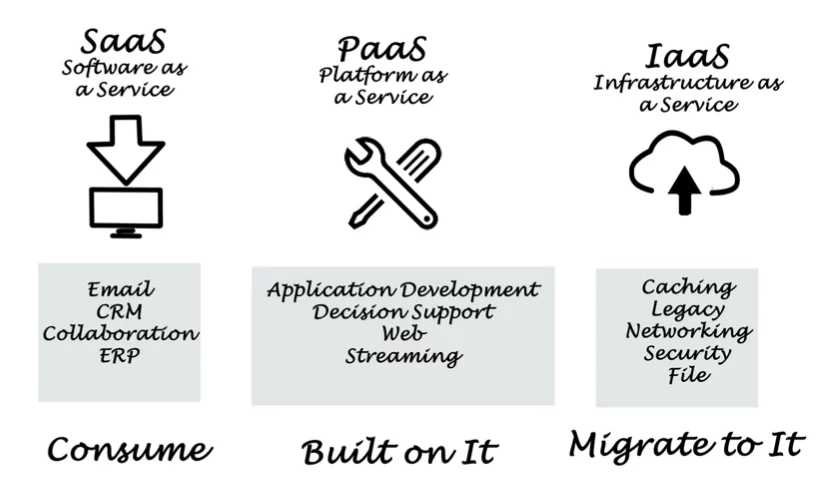
Software as a Service is one of three types of cloud service
The other two are : PaaS and IaaS. Below is a quick explanation to illustrate the difference:
- PaaS (Platform as a Service) is a cloud service provider that offers users a platform for developing, deploying and managing applications over the internet. Users can develop their own applications using tools and programming languages supported by the PaaS provider. They can deploy and manage these applications on the cloud platform provided by the PaaS provider. This allows users to concentrate on developing applications without having to manage the underlying infrastructure.
- IaaS (Infrastructure as a Service) is a cloud service that offers users virtualised computing resources over the Internet. These include servers, storage and network infrastructure. Users can deploy and manage their own applications and operating systems on the cloud infrastructure provided by the IaaS provider. This allows them to grow their IT resources as they need them, without any on-site infrastructure.
Would you like more information?
Here are some other blog posts:
7 things you need to know before launching your SaaS business