With the rise of digital transformation, cloud computing has become an essential part of the world of technology. It offers scalable, flexible and cost-effective solutions for businesses of all sizes. However, navigating the different types of cloud services can be complex.
Understanding the differences between SaaS, PaaS and IaaS is essential for businesses looking to exploit cloud infrastructure effectively. SaaS delivers cloud application services directly to users over the internet, eliminating the need for in-house software application management.
This article aims to decode the cloud and provide a detailed comparison of the three main cloud service models: Software as a Service (SaaS), Platform as a Service (PaaS) and Infrastructure as a Service (IaaS).
Understanding cloud services
Cloud services refers to the wide range of on-demand services provided to businesses and customers over the Internet. These services are designed to provide easy and affordable access to applications and resources, without the need for in-house infrastructure or hardware.
The flexibility of cloud computing services lies in the variety of offerings, including software as a service (SaaS), platform as a service (PaaS) and infrastructure as a service (IaaS). These models meet different needs, allowing businesses to choose the most appropriate cloud computing service provider and platform.
Whether a company is looking to host its website, develop new applications or store and analyse data, there is a cloud computing model to meet these objectives.
By choosing to use the cloud, businesses can benefit from scalable resources that can be adjusted according to demand, enabling them to operate more efficiently and respond more quickly to changes in the market.
This adaptability makes cloud services an invaluable tool for businesses looking to innovate and grow in a rapidly changing digital landscape.
This video will give you a better understanding of the cloud and cloud services:

A brief overview of SaaS, PaaS and IaaS
SaaS, PaaS and IaaS are the three main categories of cloud services. SaaS is a software distribution model, PaaS provides a platform for application development and IaaS a virtualised IT infrastructure.
Each of these cloud service models offers unique benefits and is designed to meet different business needs. SaaS, for example, allows businesses to access and use application software over the internet without worrying about installation, maintenance or coding. This makes it ideal for businesses looking for rapid deployment and low IT costs.
PaaS offers a complete development and deployment environment in the cloud, with resources that enable businesses to develop, manage and run applications without the complexity of building and maintaining the infrastructure generally associated with the process. PaaS is therefore ideal for developers and companies that focus on creating software products.
IaaS, on the other hand, provides scalable and automated IT resources, offering a high degree of control over the IT infrastructure. It is particularly advantageous for businesses that need extensive control over their environment, but also wish to avoid the capital expenditure associated with physical hardware. Together, these models form a range of cloud services that can support a wide range of business operations, from simple application hosting to complex, scalable application development environments.
SaaS - Software as a Service

What is SaaS?
Software as a Service, or SaaS, is a cloud computing model in which a service provider hosts applications for customers and makes them available to those users via the internet. SaaS is comparable to renting a fully equipped flat instead of buying a house.
In the SaaS model, the supplier takes care of all the complexities associated with infrastructure, middleware, application software and application data. Users simply access the SaaS product via a web browser or application interface, without worrying about maintenance, updates or security. This arrangement allows companies to offload significant IT responsibilities onto the SaaS provider, allowing them to focus on their core business rather than IT management.
The SaaS service is generally subscription-based, offering flexibility and scalability to users who can adjust their subscriptions according to their needs. This means that businesses can increase or decrease their capacity without significant upfront costs or long-term commitments.
Because the SaaS provider manages all the technical aspects, from software updates to security patches, users benefit from access to the latest features and protection, ensuring that the SaaS product remains both up-to-date and secure.
Advantages and limitations of SaaS
The benefits of SaaS include a reduction in the time and money spent on tedious tasks such as installing, managing and upgrading software. This frees up technical staff to focus on tasks that are more important to the business. SaaS also makes it easy to adapt software as the business grows.
What's more, SaaS offers unrivalled flexibility, enabling businesses to access their applications from anywhere in the world, as long as there is internet connectivity. This improves collaboration between geographically dispersed teams, fostering a more dynamic and productive working environment.
Despite its advantages, reliance on internet connectivity means that any performance problems or outages can have a direct impact on access to the SaaS product, potentially interrupting business operations.
In addition, while SaaS providers generally invest heavily in security, the shared responsibility model of cloud services means that understanding and mitigating the risks associated with security can be a major challenge. data confidentiality and compliance are partly the customer's responsibility.
It is therefore necessary to evaluate SaaS providers carefully and ensure that they comply with the standards and regulations in force in the company's sector of activity. It is essential for businesses to balance these benefits and limitations when integrating SaaS solutions into their IT strategy, to ensure that they reap the benefits of cloud computing while mitigating its potential risks.
SaaS use cases and examples
Examples of SaaS applications include Google Apps, Salesforce, Workday, Concur and Cisco WebEx.
- Google Apps (G Suite) A suite of’productivity and collaboration tools which includes Gmail, Docs, Drive, Calendar and Meet for seamless collaboration within organisations.
- Salesforce A complete solution for customer relationship management (CRM), which offers cloud-based applications for sales, service, marketing and more, to foster better customer relationships.
- Workday Provides financial management software solutions and human capital management solutions, designed to help businesses manage their activities on a global scale.
- Concur : Offers integrated management solutions travel and expenses, simplifying the way employees declare their expenses and helping companies to manage their spending.
- Cisco WebEx : Enterprise solution for videoconferencing, online meetings, screen sharing and webinars, facilitating collaboration between remote teams and customers.
- Facilitag A platform which lets you report an incident on any type of appliance (coffee machine, toilet, etc.) simply by scanning a QR code.
- Vitamin AI a platform which uses artificial intelligence to improve content creation. By analysing data and trends, it offers personalised suggestions to improve your writing, marketing strategies and audience engagement.
This article tells you the 7 things you need to know before launching your SaaS business.
PaaS - Platform as a Service

What is PaaS?
Platform as a Service, or PaaS, provides a platform and environment for developers to create applications and services over the Internet. PaaS services are hosted in the cloud and users simply access them via their web browser.
PaaS offers a complete framework that developers can exploit to build or customise applications quickly and efficiently, significantly reducing the complexity associated with purchasing, configuring and managing the underlying software and hardware layers.
With a PaaS solution, the PaaS provider manages these layers, offering developers various services and tools such as development tools, database management systems and middleware via PaaS platforms. This configuration allows developers to concentrate on the creative aspect of application development without worrying about system maintenance or software updates.
PaaS platforms also facilitate collaboration between development teams, as they can work together on projects from different locations and in real time.
PaaS enables companies to streamline their development processes, accelerate time-to-market and reduce costs, making it an invaluable asset for businesses looking to innovate and evolve their applications in a competitive market environment.
Advantages and limitations of PaaS
PaaS increases developer productivity, encourages high-level programming while reducing complexity, facilitates collaborative working even when teams are working remotely, and helps to create prototypes quickly.
Using PaaS to develop applications offers a number of significant advantages, as PaaS provides a framework that gives developers a suite of tools to innovate faster and more efficiently than traditional development environments.
This is particularly advantageous for sectors such as e-commerce, where the ability to adapt quickly and deploy new functionalities can have a direct impact on the success of the business. PaaS facilitates this agility, allowing developers to rapidly prototype, test and deploy applications.
In addition, PaaS for e-commerce can streamline the integration of various payment gateways, inventory management systems and customer relationship management (CRM) tools, providing a consistent and flexible platform for business growth.
However, while PaaS offers a number of advantages, it is important to be aware of potential drawbacks, such as the risk of vendor lock-in, which can limit future flexibility and control over development tools and environments. Developers may also face restrictions on custom configurations or specific technologies imposed by the platform.
Despite these challenges, the benefits of PaaS in boosting productivity, promoting innovation and facilitating collaboration make it a compelling choice for businesses looking to leverage cloud technology for application development.
PaaS use cases and examples
Examples of PaaS include AWS Elastic Beanstalk, Google App Engine and Heroku.
- AWS Elastic Beanstalk : A easy-to-use service to deploy and scale web applications and services developed with Java, .NET, PHP, Node.js, Python, Ruby, Go and Docker on familiar servers such as Apache, Nginx, Passenger and IIS.
- Google App Engine : Allows developers to create highly scalable applications on a fully managed serverless platform, without worrying about the underlying infrastructure.
- Heroku A platform which allows developers to build, run and manage applications entirely in the cloud, supporting multiple programming languages and integrating with various cloud services and databases.
IaaS - Infrastructure as a Service

What is IaaS?
Infrastructure as a Service (IaaS) involves outsourcing the equipment used to support operations, including storage, hardware, servers and network components, all of which are accessed via a network.
IaaS providers manage vast cloud computing infrastructures, offering businesses scalable and flexible solutions that adapt to their growing needs. When businesses use IaaS, they rent the necessary IT resources from an IaaS provider rather than investing in physical hardware themselves.
This model allows businesses to access a wide range of IT resources, from virtual machines to storage and networks, over the internet. IaaS is highly scalable, so businesses can easily increase or reduce the use of their resources according to demand, ensuring that they only pay for what they use.
This flexibility is one of the hallmarks of IaaS solutions, making them an attractive option for start-ups and large enterprises alike. IaaS products also relieve businesses of the complexity of managing physical servers, as IaaS providers take care of maintenance, backups and system updates.
By offering on-demand access to IT resources, IaaS provides a solid foundation for businesses looking to create or develop their digital services without having to bear the upfront costs and complexity of setting up and managing a physical data centre.
Advantages and limitations of IaaS
IaaS offers great scalability, flexibility and security, and allows businesses to pay only for what they use.
Another advantage of IaaS is its ability to democratise access to top-of-the-range IT resources, previously reserved for large companies with substantial IT budgets.
This form of IaaS enables businesses of all sizes to be more competitive by using the same type of technology infrastructure. The cloud IaaS model provides access to a wide range of resources, including advanced computing power, storage capacity and networking technology, all of which can be made available quickly and tailored to meet the requirements of any project or workload.
IaaS allows organisations to focus on their core competencies by outsourcing the complexities of managing physical servers, data centre space and network equipment.
Despite these benefits, potential challenges such as vendor lock-in and security risks need to be carefully managed. Vendor lock-in can limit a company's flexibility to change suppliers or technology, while security issues require diligent monitoring to ensure data integrity and regulatory compliance.
Nevertheless, when implemented strategically, IaaS offers a powerful platform for innovation, scalability and operational efficiency.
IaaS use cases and examples
Examples of IaaS include DigitalOcean, Linode, Rackspace, Amazon Web Services (AWS), Microsoft Azure and Google Compute Engine (GCE).
- DigitalOcean : Offer of cloud services designed to simplify web infrastructure for developers by providing droplets (virtual machines) with various configurations to suit different workloads, as well as managed databases and storage options.
- Linode : Linode provides cloud services with a focus on simplicity and affordability, offering virtual servers, managed Kubernetes and additional services such as object storage, making it suitable for both small projects and enterprise needs.
- Rackspace : Specialises in managed cloud services, AWS, Google Cloud and Microsoft Azure, as well as dedicated hosting and cybersecurity services.
- Amazon Web Services (AWS) : Premiere cloud platform AWS offers a wide range of IaaS, PaaS and SaaS solutions, including computing power, storage options and AI capabilities, for businesses of all sizes.
- Microsoft Azure A robust cloud platform offering a wide range of services, including AI, machine learning, Internet of Things (IoT) integrations and analytics, alongside traditional compute and storage solutions, supporting a variety of programming languages and frameworks.
- Google Compute Engine (GCE) : GCE offers scalable and efficient virtual machines running in Google's advanced data centres and global fibre network, with a focus on performance, scalability and security for compute- and data-intensive applications.
Key differences: SaaS vs PaaS vs IaaS
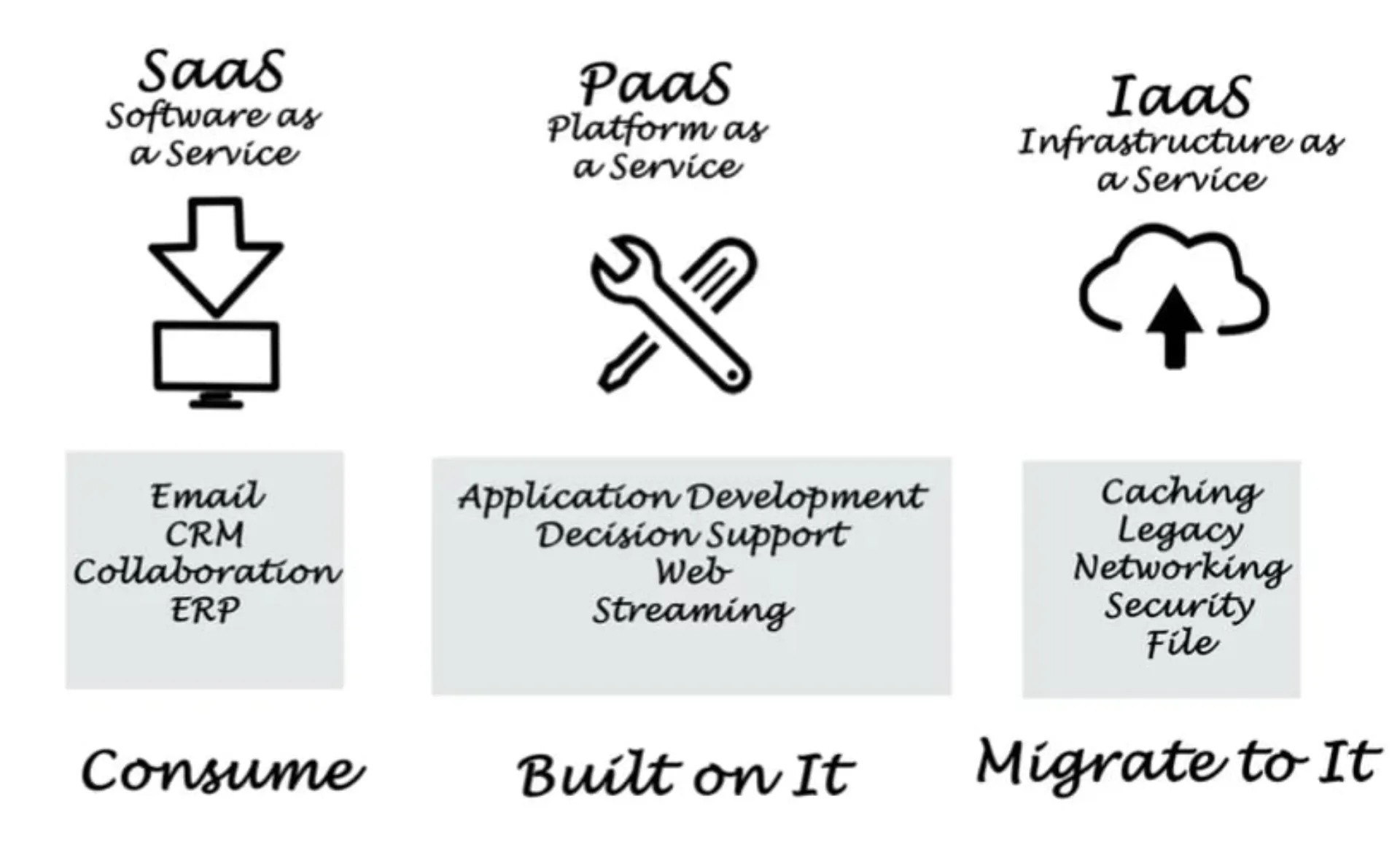
Comparison based on infrastructure
In SaaS, users do not have to manage or control the underlying infrastructure. In PaaS, users manage the applications and data, while everything else is taken care of by the provider. In the IaaS model, users manage the data, the runtime, the applications and the infrastructure. intermediate software and applications.
This breakdown of responsibilities between the SaaS, PaaS and IaaS models illustrates the different levels of control and management required from users, adapted to different needs and levels of expertise.
In the SaaS model, the supplier's management of the entire infrastructure and applications means that users can concentrate solely on using the software to achieve their business objectives, without having to worry about technical maintenance or updates.
PaaS offers an intermediate solution, giving developers the freedom to create and deploy applications on a managed platform, eliminating the complexity of managing hardware and operating systems, but still requiring them to manage the application's behaviour and data.
IaaS offers the highest level of control, appealing to organisations that need to customise and control their applications and infrastructure, but it requires a higher degree of IT sophistication to manage the different components effectively.
This flexibility allows businesses to choose the cloud service model that best suits their specific operational needs, technical capabilities and strategic objectives, enabling them to optimise their resources and focus on innovation.
Price comparison
The prices of SaaS, PaaS and IaaS reflect their different levels of service and user control.
SaaS, which provides a complete, managed service, is generally more expensive because of its extensive support and maintenance packages.
PaaS strikes a balance, offering development and deployment platforms without the need for infrastructure management, making it cost-effective for developers looking for convenience with a degree of control.
IaaS is the most cost-effective solution, suitable for businesses that are ready to manage their applications and infrastructure, offering scalable resources on a pay-as-you-go basis.
SaaS solutions are the most expensive, while IaaS solutions are the most cost-effective. PaaS falls somewhere in the middle, offering a balance between cost-effectiveness and functionality.
Each cloud service model meets different operational needs and budgetary considerations, allowing businesses to choose the solution that best fits their strategic objectives and financial constraints.
How to choose the right cloud service
Assessing the company's needs
To choose the right cloud service, businesses need to carefully assess their needs in terms of management control, technical expertise and budget.
SaaS offers a fully managed solution, ideal for businesses with limited IT resources, while IaaS provides flexibility for those with the ability to manage their infrastructure. PaaS is suitable for developers looking to avoid the complexity of infrastructure management.
Budgetary considerations also have a significant influence on the decision, as each model has different cost structures.
By assessing these factors, organisations can select a cloud computing service that matches their business objectives and resources.
Make an appointment with us today for the solution best suited to your needs.
Book a BOUTON meeting
Assess the supplier's capabilities
When selecting a cloud service provider, it is essential to assess its reliability, i.e. its track record in terms of uptime and its ability to keep services available at all times.
Scalability is another key factor, as the supplier must be able to adapt effectively to your company's growth and changing needs. Equally important is the level of support offered, which must include responsive technical assistance and resources to resolve problems quickly.
A supplier's commitment to these areas ensures that businesses can rely on their cloud services for operational stability and growth, making the assessment of these capabilities a crucial step in the selection process.
Taking future needs into account
Businesses need to choose a cloud service that not only meets their needs today, but also has the potential to meet their needs in the future.
Understanding the differences between SaaS, PaaS and IaaS can help businesses make informed decisions about which cloud service is best suited to their needs. By doing so, they can take full advantage of the benefits of cloud computing and drive their business forward.
Understand better what a Saas thanks to the perfect guide.